Bring your own songs
No catalogue to browse. Import what you already have — and start with an example songbook of public-domain songs already in place, so there's something to play from minute one. Edit it your way, export it whenever you like.


Not a catalogue to browse — the songs you actually play, in a songbook that's yours to edit, carry and keep. Plain text files underneath, no ads, and nothing you can't take with you.
Words on the line, chords above them — the same layout you read from on stage. Simple to use, no syntax to remember.
Tap above a line and the chord lands on the syllable under your finger. Drag to nudge it letter by letter, or past the last word where the turnaround goes.
Words are just text — the chords follow the words they sit on. Fix a verse two minutes before you play and it's saved to your reading screen.
Every edit writes standard ChordPro. Read the source anytime, export a song or your whole library — nothing here is locked in.
Transpose with a tap and the whole sheet reletters with you — chords, diagrams, fingerings, all in the new key.
Each fret shows how many of the song's chords it leaves open, so the shapes you read are the shapes you already know.
Diagrams before the song, fingerings on one line, shapes drawn on the syllable, or just the names — and any chord opens full size with a tap.
Auto-scroll follows the speed you set, so the page keeps moving while both hands stay on the instrument.
I used to juggle tabs, a hundred open tabs
Banner ads and popups, losing where I was
Now it's in my pocket, works without a signal
Offline on a mountain, still it's all here
Strumfolio, take it anywhere
No wifi, no worries, I don't care
Every song I love, one tap away
Transpose it, play it, my way
C
C · E · G
Share a link or a QR code. Whoever opens it follows the same song, in the same key, scrolling on its own.
Scanning the leader's codeNo app, no account.
Strumfolio, take it anywhere
No wifi, no worries, I don't care
Every song I love, one tap away
Transpose it, play it, my way
Two chairs and a kitchen table
Everybody on the same page
One phone leads, the rest just follow
Same page, same key, nobody lost
Sing it once and sing it louder
Kitchen light until the morning
Strumfolio, take it anywhere
No wifi, no worries, I don't care
Every song I love, one tap away
Transpose it, play it, my way
Two chairs and a kitchen table
Everybody on the same page
One phone leads, the rest just follow
Same page, same key, nobody lost
Sing it once and sing it louder
Kitchen light until the morning
Whoever opens the link follows the song and the key you're reading it in, live — no account needed on their side.
strumfolio.com/follow/8f2c1a9d
Copy link0 devices following1 device following2 devices following
Stop broadcastingScanning the leader's codeNo app, no account.
Strumfolio, take it anywhere
No wifi, no worries, I don't care
Every song I love, one tap away
Transpose it, play it, my way
Two chairs and a kitchen table
Everybody on the same page
One phone leads, the rest just follow
Same page, same key, nobody lost
Sing it once and sing it louder
Kitchen light until the morning
Whoever's playing controls the song — line, section, chord — for everyone.
Each person reads clearly, on their own device, always on the same line.
No sign-up, no setup. Share a link, and anyone can join in seconds.
Organise your songbooks at the desk on Windows or Mac, then open the same library on whatever's propped up in front of you — Android or iPad — and keep reading and playing if there is no signal.
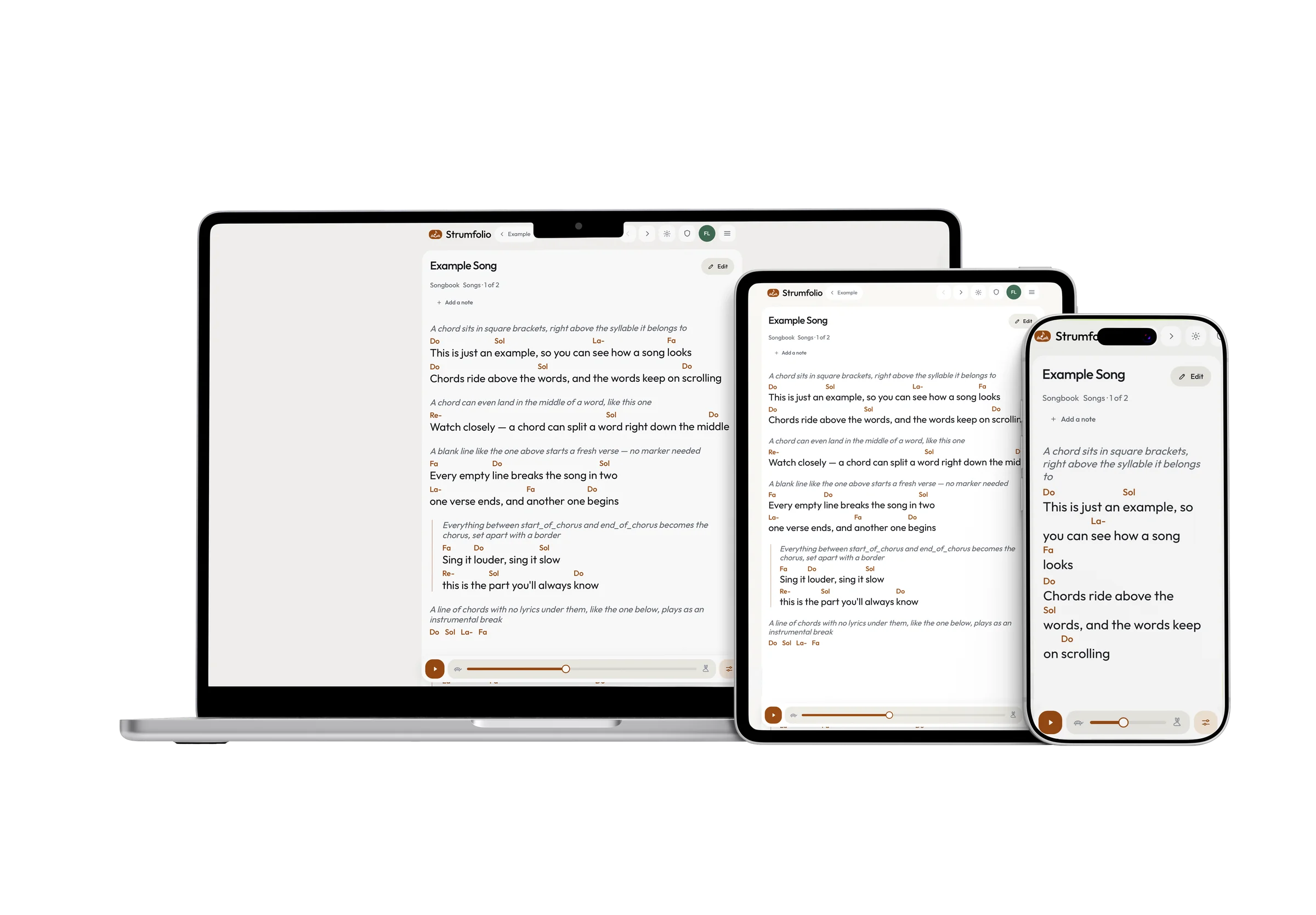
Every control is built for a thumb, not a mouse — for a hand already holding an instrument.
No catalogue to browse. Import what you already have — and start with an example songbook of public-domain songs already in place, so there's something to play from minute one. Edit it your way, export it whenever you like.
Sections, metadata, chord definitions, annotations, custom directives: Strumfolio speaks the published ChordPro specification, not a format only we can read. What a scrolling screen can't draw — fonts, colours, page breaks — is kept untouched in your file rather than dropped, so nothing you wrote is lost on the way in.
Open it on your phone like any app. Once your repertoire is saved, it's there for good — anywhere you go, no signal required.
Keep sets, bands and occasions apart, each one split into its own sections — always the song you're after, never an endless list. How many songbooks you can keep depends on your plan.
Connect Claude, Codex, Cursor or another assistant that speaks MCP, and ask it to transpose a song, turn pasted lyrics into ChordPro or tidy a songbook. It never deletes anything, and every song it rewrites keeps its previous text, one tap away. From the Standard plan.
Share a link. Every device follows the same song, in the same key — near or far, with nothing to install and no account for anyone following. Every plan starts one, the free plan included, with 1 screen following; the paid plans bring more of the room in.
Transpose with a tap, sing in your key. Then let the smart capo suggestion do the math: it finds the fret with the most open chords, so you play the easiest shapes — not just the right sound.
Stuck on a chord? Tap it and see the shape, ready to play — guitar on every plan, ukulele on the paid ones.
Do-Re-Mi, C-D-E, the German convention with H for B, or Nashville numbers — each chord written as the degree it plays in the key, so the sheet reads the same however far you transpose it. Chosen once, for every song you read.
Bigger text, auto-scroll at your pace — readable in any condition, on any phone or tablet. Your hands stay on the instrument.
Pin a private reminder to the exact syllable, or to the chord standing over it — a fingering, a cue, the line you always get wrong. Yours alone, and there with no signal.
Turn any songbook into a typeset PDF — chords above the words, one song a page, a cover and an index — ready to print and hand out. Part of the paid plans.
Sign up with your email or with Google and get your own account and your own songbooks — nothing shared, nothing to manage on anyone else's behalf. From the moment you're in, it's yours alone.
Strumfolio isn't a library you browse — there's no catalogue to search. You bring your own songs, imported from what you already have. So you don't start from a blank page, a new account arrives with one example songbook of public-domain songs already in it — an ordinary songbook you can edit, rename or delete like any other.
ChordPro is what Strumfolio reads and writes — and around it, the dialects other apps use, OnSong, MusicXML, a SongbookPro backup, PDF, Word, and a zip holding any of those: fifteen file types in all, plus any text you can paste.
Chords written above the words are converted for you, always behind a preview you can correct before anything is saved, since that conversion is a guess and not always the right one.
Export hands you standard ChordPro back — one song, or the whole collection as a zip.
Behind the scenes, every song on Strumfolio is saved in ChordPro, the standard format for lyrics and chords. Because we don't use closed, proprietary formats that only we understand, when you export your repertoire you will get back clean, universal files ready to be opened anywhere.
Closely, and deliberately so. Strumfolio implements ChordPro as published in the ChordPro cheat sheet (version 6.07): sections and their labels, the full set of metadata directives, chord and fingering definitions, annotations, comments and custom x_ directives.
Anything the specification defines for print typesetting — fonts, colours, page and column breaks — has no equivalent on a scrolling screen, so Strumfolio carries it through your file untouched rather than dropping it.
Export a song you imported and it comes back as you wrote it, down to the directives we never act on; only the title, artist, songbook and section are rewritten in the standard spelling, because those four are the fields Strumfolio keeps of its own.
The free plan holds 1 songbook and 30 songs. Standard holds 3 songbooks and 300 songs, counted across the whole account rather than per songbook; Plus and above have no limit on either. The pricing page lists all four side by side.
It checks every possible fret position and finds the one that lets you play the most open chords. That means you get the easiest shapes for your hands, not just a fret that happens to match the right sound.
Yes — tap any chord in a song and see exactly where to place your fingers. Guitar is on every plan, including the free one; the ukulele comes with the paid plans.
No — the alphabet is how a sheet is drawn for you, not something stored inside it. Your files keep standard chord names, so an export reads the same for anybody you send it to, and the choice sits on your account rather than on one song.
The one place you read somebody else's choice is while following a Strum Together session: there the alphabet arrives from whoever is leading, along with the key.
No. The visual editor shows the song exactly as it reads — words on the line, chords above them — and writes standard ChordPro for you underneath. If you like working with brackets, the Source view is one tap away, and the two can never disagree.
Tap above a line and the chord lands on the syllable under your finger; hold and drag to nudge it letter by letter.
Chords can also sit past the last word — for a turnaround or an outro — and a tap between two chords slips a new one exactly there. While you name it, the song's own chords are one tap away as suggestions.
Yes. Strumfolio speaks MCP, the standard way AI assistants connect to other apps: create a personal token in the app, paste it into Claude Code, Claude Desktop, Codex, Cursor, VS Code, Gemini CLI or Windsurf, and ask in your own words.
The assistant can list and search your songbooks, read a song, write or rewrite it in ChordPro, move it to another section, and create or rename songbooks and sections. For example:
It can never delete anything; every song it changes keeps the previous text, which you restore from the editor in one tap; and if you change a song on your phone while it is working, it has to read it again instead of overwriting you.
ChatGPT cannot connect yet — it needs a sign-in Strumfolio does not offer so far. AI access comes with Standard, Plus, Premium and Lifetime.
Neither an app store nor an install step is required — just open Strumfolio on your phone like any regular app, straight from the browser. If you want it to have its own icon, the menu has an Add to home screen entry: one tap on Android, and on an iPhone it shows the three steps Safari needs.
Nothing changes. Once your repertoire is saved, it stays fully available on your device — no signal required, on stage or anywhere else.
Yes, and with nothing to back up or transfer by hand. An edit is on the reading screen of the device you made it on the moment you save it, and every other device you own picks it up as soon as it is online.
Every plan can lead one, free included, and how many follow is what changes: Free and Standard add 1 other device, Plus 3, Premium and Lifetime 100.
The device you play from is never counted, so Free is you and one other screen. Anyone can follow with no account at all — the limit is on how many follow at once, never on who.
No sign-up and no setup required. Anyone with the link can join instantly and start singing along within seconds.
No. Since every device needs to stay in sync in real time, Strum Together requires an active internet connection to work.
The song as written, by default — a booklet is meant to be printed and handed to other people, so it's typeset in each song's own key (with the capo or transposition the song file itself sets, if it sets one), not whatever transposition or capo you personally have set for reading, which wouldn't mean anything on somebody else's copy.
You can choose your own key and capo instead, one download at a time, for a personal copy — every song printed that way says so on its own page.
One PDF per songbook — pick which one from the Printable booklet screen in the menu and download it. If you keep separate songbooks for separate sets or bands, each one becomes its own booklet, complete with its own cover and index.
There is a free plan, and it does not run out: 1 songbook, 30 songs, a Strum Together session with 1 other device following, and everything needed to read and play them — no card, and no trial counting down.
The paid plans lift those limits and add the printed booklet, the ukulele and access for AI assistants; the pricing page has all four.
The paid plans are live — pick one on the pricing page whenever you're ready. Already over a limit? Nothing of yours is deleted — you can only delete until you are back under it, the same as if a paid plan lapses.
Standard, Plus and Premium are subscriptions — monthly or yearly, as you choose — and each period renews into another of the same length until you stop it; Lifetime is a single payment with no renewal ever due.
Cancelling is a control on the Plan & billing page inside the app, and it stops the next renewal rather than the plan you hold: you keep that until the end of the period you have paid for, and the account then returns to the free plan, where everything you put in stays readable and exportable.
A change that costs more — a higher plan on the same billing cycle, or moving to yearly billing on the same plan or a higher one — takes effect immediately; one that would hand back part of what you have paid — a lower plan, a cancellation, or moving from a paid year to monthly — waits for the end of the period already paid for, and you can undo a scheduled change any time before it lands.
Fourteen days from a purchase to withdraw from it and get the whole amount back, without giving a reason and with no deduction for the days you used it — the same fourteen days wherever you live, and for Lifetime too.
Write to us from the address on your account and say so; there is no form to fill in, and the Terms page carries both the address and a sentence you can copy.
And if a renewal goes through that you did not mean to keep, tell us within fourteen days of the charge and we refund it, ending the plan at once.
No — there's no shared songbook to invite anyone into. Anyone can create their own account — with an email and password, or with Google — and gets their own collection, kept separate from everyone else's.
Your collection is private by default, visible only to you — nobody else has access to an account that isn't theirs. The one exception is a Strum Together session you start: while it is live, whoever holds its link can open your songs.
Yes, in one download: Backup gives you the whole repertoire as a zip of standard ChordPro files — plain text you can read yourself and hand to another app.
Nothing here is kept in a format only Strumfolio understands, and closing the account for good is a button in your own settings rather than a request you have to send us.
Every plan side by side, on the pricing page.